
Blog
Read what's happening in FirstouchKiosk | Keep update yourself about best digital signage solution & technology. Learn how digital signage / digital kiosk / digital notice board and digital standees can help in your business growth.
Read what's happening in FirstouchKiosk | Keep update yourself about best digital signage solution & technology. Learn how digital signage / digital kiosk / digital notice board and digital standees can help in your business growth.
 Commercial Display |
  17th Jul 2026
Businesses no longer compete only on the quality of their products or services—they compete on customer experience. Whether you’re managing a retail store, restaurant, corporate office, hospital, educational institution, shopping mall, or airport, the way you communicate with customers significantly influences purchasing decisions.
Traditional printed signage is static, expensive to update, and difficult to manage across multiple locations. Modern organizations are replacing printed posters with commercial displays that deliver dynamic, engaging, and centrally managed content.
A commercial display is a professional-grade digital screen specifically engineered for continuous business use. Unlike consumer televisions, commercial displays are built to operate reliably for extended hours, often 16/7 or 24/7, while delivering consistent image quality, higher brightness, remote management capabilities, and longer operational life.
Commercial displays are widely used to present advertisements, promotional campaigns, product catalogs, digital menus, corporate announcements, queue information, interactive directories, dashboards, and customer communications.
Typical commercial display environments include:
The shift toward digital communication isn’t simply a design trend—it’s a strategic business decision.
Modern businesses require content that can change instantly, remain consistent across locations, and adapt to promotions, inventory, or operational updates without the recurring costs of printing and installation.
Commercial displays enable organizations to:
This flexibility makes commercial displays a valuable asset across industries where communication speed and consistency directly impact business performance.
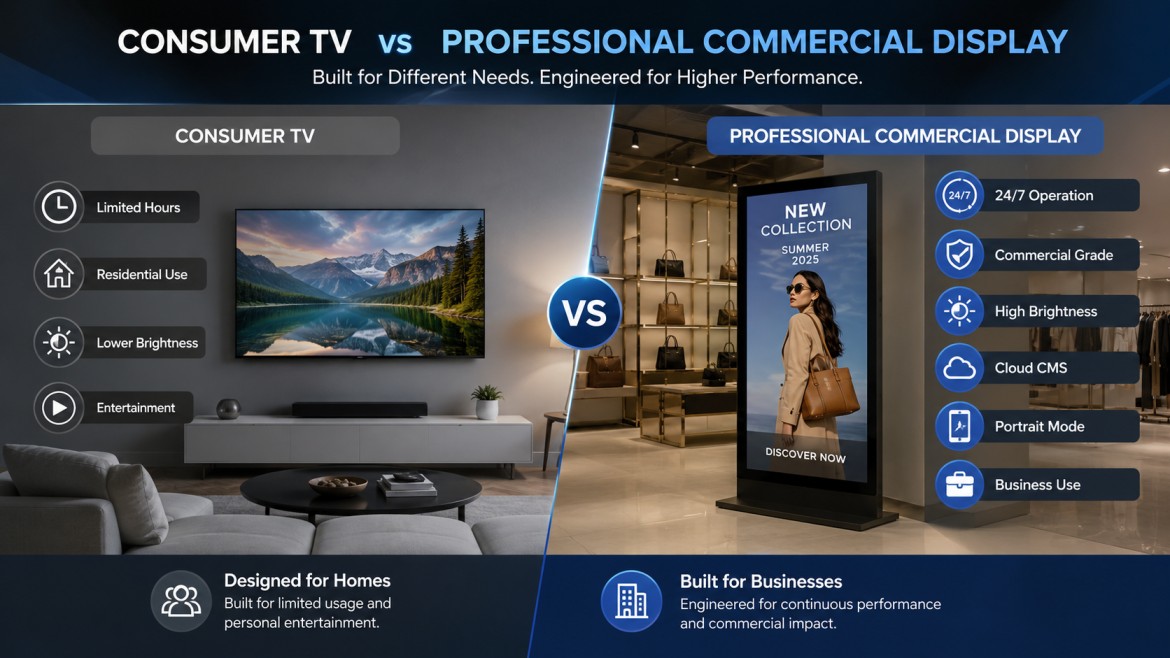
One of the most common purchasing mistakes is assuming a standard television can replace a commercial display. While they may appear similar, they are designed for entirely different purposes.
| Feature | Commercial Display | Consumer TV |
|---|---|---|
| Daily Operation | 16/7 to 24/7 | 4–8 hours |
| Brightness | High (typically 500–3500 nits depending on use case) | Lower brightness |
| Orientation | Landscape & Portrait | Primarily Landscape |
| Remote Management | Yes | Limited |
| Digital Signage CMS | Supported | Rarely supported |
| Warranty | Commercial Warranty | Residential Warranty |
| Build Quality | Industrial Grade | Consumer Grade |
| Lifespan | Significantly Longer | Moderate |
| Installation Options | Flexible | Limited |
| Business Reliability | Excellent | Not Designed for Commercial Use |
For businesses operating throughout the day, commercial displays provide greater reliability, lower maintenance, and better long-term value than consumer televisions.
Customers make purchasing decisions in seconds. Visual communication plays a significant role in attracting attention, conveying information, and influencing buying behavior.
A strategically placed commercial display can:
In sectors such as retail and hospitality, these improvements can contribute to measurable gains in engagement and sales, particularly when displays are paired with well-designed content and regular campaign updates.
Selecting the right display involves more than comparing screen sizes. Decision-makers should evaluate features that affect reliability, usability, and long-term ownership costs.
Designed for continuous operation with enhanced durability and consistent image performance.
Brightness levels vary depending on the environment:
Higher brightness ensures content remains visible under varying lighting conditions.
Businesses operating around the clock require displays capable of continuous performance without overheating or image degradation.
Most modern commercial displays support:
Higher resolution enhances readability, especially for detailed product information and promotional graphics.
Commercial displays can be installed vertically or horizontally depending on the application, making them suitable for:
Many commercial displays integrate with digital signage software, allowing organizations to:
Centralized content management simplifies operations, particularly for businesses with multiple branches.
Modern commercial displays are engineered to balance performance with power consumption, helping reduce operational costs over time.
Commercial displays are used across a wide range of sectors to improve communication, customer engagement, and operational efficiency.
Retail businesses use commercial displays to:
Restaurants increasingly replace printed menus with digital menu boards that enable quick updates, improve visual appeal, and support promotional campaigns.
Hospitals and clinics use commercial displays for:
Organizations deploy commercial displays for:
Educational institutions use commercial displays to communicate:
Hotels leverage commercial displays to enhance guest experiences through:
A commercial display is more than an advertising screen. When integrated into daily operations, it becomes a strategic communication tool that can:
Organizations that view commercial displays as part of their broader digital transformation strategy often unlock greater value than those using them solely for promotions.
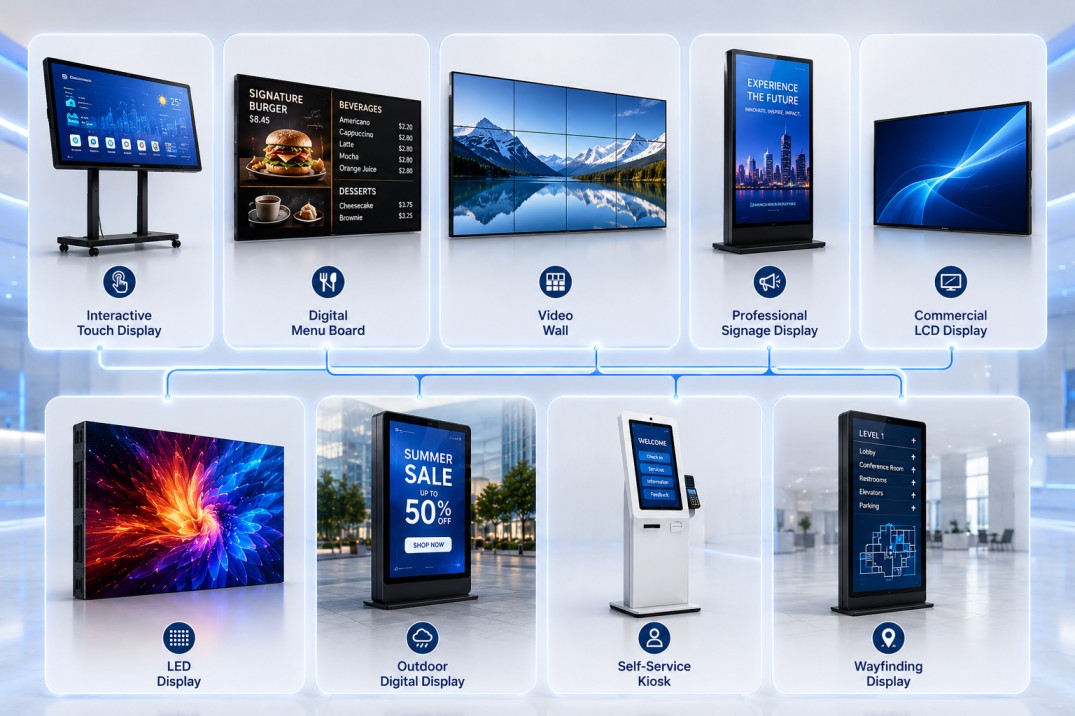
Not all commercial displays are designed for the same purpose. The ideal solution depends on your environment, audience, content strategy, and operational requirements. Understanding the available options helps businesses make informed investment decisions while ensuring long-term value.
Professional Signage displays are among the most widely used digital signage solutions. They offer excellent image quality, reliable performance and are suitable for continuous operation in a variety of indoor environments.
Ideal keyword targets: commercial LCD display, professional LCD display, business display screen
LED displays use light-emitting diodes to create bright, seamless visuals that remain visible even in challenging lighting conditions. Unlike LCD screens, LED walls can be assembled into virtually any size without visible bezels.
✔ Exceptional brightness
✔ Large-format viewing
✔ Modular design
✔ Long operational life
✔ Excellent visibility from a distance
Interactive displays transform passive communication into engaging customer experiences. These screens allow users to navigate menus, browse catalogs, complete registrations, or interact with digital content through touch.
Digital signage refers to the combination of commercial display hardware and content management software that enables businesses to publish and manage multimedia content remotely.
A digital signage network can include:
Businesses operating multiple locations often rely on cloud-based digital signage software to maintain consistent branding while updating content in real time.
A video wall combines multiple commercial display panels into one large visual canvas. This solution is ideal when businesses need to display high-impact content or monitor multiple information sources simultaneously.
Selecting the right display technology depends on viewing distance, ambient lighting, budget, and content requirements.
| Technology | Best For | Brightness | Cost | Lifespan |
|---|---|---|---|---|
| LCD | Retail, Offices, Hospitals | High | $$ | Excellent |
| LED | Large Displays, Outdoor | Very High | $$$$$ | Excellent |
| OLED | Premium Visual Experiences | Moderate | $$$$ | Good |
| QLED | Premium Retail Displays | High | $$$ | Excellent |
One of the biggest buying mistakes is selecting an indoor display for an outdoor or high-ambient-light environment.
| Feature | Indoor Display | Outdoor Display |
|---|---|---|
| Brightness | 350–700 nits | 2,500–5,000+ nits |
| Weather Protection | No | Yes (IP-rated) |
| Temperature Resistance | Moderate | High |
| Sunlight Readability | Limited | Excellent |
| Typical Applications | Offices, Retail, Hotels | Transit, Billboards, Stadiums |

Screen size should match the viewing distance and application rather than simply choosing the largest option.
| Screen Size | Typical Application |
|---|---|
| 32″ | Reception areas, Lobby areas |
| 43″ | Retail shelves, offices |
| 50″ | Restaurants, hospitals |
| 55″ | Digital signage, corporate spaces |
| 65″ | Conference rooms |
| 75″ | Auditoriums |
| 86″ | Training rooms |
| 98″+ | Boardrooms, command centers |
Choosing the correct size ensures better readability and improves customer engagement without unnecessary expenditure.
When comparing commercial displays, decision-makers should look beyond screen size and price.
Designed for long operating hours with improved durability and consistent image quality.
Suitable for businesses that require uninterrupted performance.
Ensures clear visibility under different lighting conditions.
Reduces reflections in brightly lit environments.
Maintains image clarity even when viewed from the side.
Allows content playback without external hardware.
Provides flexibility based on software and application requirements.
Enables centralized monitoring and content updates across multiple locations.
Allows businesses to schedule, publish, and manage content from anywhere.
Recommended Solution
Primary Objectives
Recommended Solution
Benefits
Recommended Solution
Benefits
Recommended Solution
Benefits
Recommended Solution
Recommended Solution
Many organizations focus primarily on price rather than total cost of ownership. This often leads to avoidable expenses and operational challenges.
Avoid these common mistakes:
Before contacting suppliers, consider the following:
Taking the time to answer these questions helps ensure you invest in a solution that meets both current and future business needs.
One of the first questions buyers ask is, “How much does a commercial display cost?” The answer depends on several technical and operational factors rather than screen size alone.
Unlike consumer televisions, commercial displays are engineered for continuous operation, higher brightness, remote management, and longer product life. These features contribute to a higher initial investment but often result in a lower total cost of ownership.
Buyer Tip: Instead of asking, “Which commercial display is the cheapest?” ask, “Which solution will deliver the best long-term value for my business?”
The purchase price is only one part of the investment. Decision-makers should evaluate the Total Cost of Ownership (TCO) over a 5–7 year period.
| Cost Category | Examples |
|---|---|
| Hardware | Display, media player, mounting accessories |
| Software | Digital signage CMS, licenses |
| Installation | Mounting, wiring, network setup |
| Content Creation | Graphics, videos, animations |
| Maintenance | Cleaning, repairs, replacements |
| Power Consumption | Electricity costs |
| Training | Staff onboarding |
| Support | AMC, warranty extensions |
A high-quality commercial display with reliable software and support often delivers a better return than a lower-cost solution with frequent downtime or maintenance issues.
Commercial displays are more than communication tools—they are business assets that can improve efficiency, customer engagement, and revenue generation.
A fashion retailer launches weekly promotions across 20 stores.
Without digital displays:
With commercial displays:
Over time, the operational savings and increased promotional agility can significantly outweigh the initial investment.
Hardware attracts attention, but Content Management Software (CMS) determines how effectively your displays communicate.
A modern CMS enables businesses to manage content across one or hundreds of screens from a centralized dashboard.
| Feature | Cloud CMS | On-Premise CMS |
|---|---|---|
| Remote Access | ✔ | Limited |
| Multi-location Management | ✔ | Depends on setup |
| Maintenance | Vendor-managed | In-house |
| Scalability | High | Moderate |
| Upfront Cost | Lower | Higher |
For organizations with multiple branches, a cloud-based CMS is typically the preferred choice due to its flexibility and ease of management.
Proper installation ensures optimal performance, safety, and longevity.
For high-traffic environments, professional installation is strongly recommended.
Even the best commercial display cannot deliver results without engaging content.
Fresh, relevant content encourages repeat engagement and maximizes the value of your display network.
Selecting the right supplier is just as important as selecting the right hardware.
A reliable partner should understand your business objectives and recommend solutions that align with your operational needs—not just offer the lowest price.
Use these questions during vendor discussions:
These questions help ensure you select a solution that delivers long-term reliability and performance.
Commercial displays are evolving beyond simple digital screens. Advances in artificial intelligence (AI), cloud computing, IoT, and data analytics are transforming them into intelligent communication platforms that can personalize content, automate updates, and provide measurable business insights.
Businesses investing today should consider not only current requirements but also future scalability.
Modern digital signage platforms are beginning to use AI to:
This enables businesses to deliver more relevant experiences while reducing operational effort.
Organizations with multiple branches increasingly rely on cloud-based systems to:
Touch-enabled displays continue to grow in popularity for:
Interactive experiences not only improve convenience but also reduce dependency on staff for routine tasks.
Replacing printed posters with digital displays helps businesses reduce recurring printing costs and paper waste while enabling faster communication. Combined with energy-efficient hardware and smart scheduling, digital signage supports broader sustainability initiatives.
Before making your final decision, ensure your chosen solution meets these requirements:
| Requirement | Yes/No |
|---|---|
| Commercial-grade panel | ☐ |
| 24/7 operation | ☐ |
| High brightness for the environment | ☐ |
| 4K resolution (if required) | ☐ |
| Portrait and landscape support | ☐ |
| Cloud CMS compatibility | ☐ |
| Remote monitoring | ☐ |
| Commercial warranty | ☐ |
| Nationwide support | ☐ |
| Installation services | ☐ |
| Future scalability | ☐ |
This checklist can also serve as a practical procurement tool during vendor evaluations.
A commercial display is a professional-grade screen designed for continuous business use. It offers higher brightness, longer operational life, remote management capabilities, and greater reliability than consumer televisions.
Commercial displays are built for extended operating hours, support portrait orientation, integrate with digital signage software, and are backed by commercial warranties. Consumer TVs are intended primarily for residential entertainment and lighter usage.
Commercial displays are widely used in retail, restaurants, healthcare, education, hospitality, banking, corporate offices, manufacturing, transportation, and government facilities.
With proper installation and maintenance, a quality commercial display can operate reliably for many years. Actual lifespan depends on usage patterns, operating hours, environmental conditions, and the quality of the hardware.
Many commercial-grade models are specifically designed for continuous 24/7 operation, making them ideal for businesses that require uninterrupted communication.
Yes. Most modern commercial displays integrate with cloud-based Content Management Systems (CMS), allowing users to update content, schedule playlists, and monitor devices remotely.
The ideal size depends on viewing distance, installation location, and content type. Reception areas, retail stores, conference rooms, and large public spaces often require different screen sizes and brightness levels.
Touch capability is beneficial for applications such as self-service kiosks, information kiosks, visitor management systems, and interactive directories. For passive advertising or announcements, non-touch displays are usually sufficient.
Regular cleaning, adequate ventilation, software updates, and periodic hardware inspections help maintain performance and extend the display’s lifespan.
Evaluate suppliers based on product quality, technical expertise, warranty, installation capabilities, after-sales support, software compatibility, and proven experience in commercial deployments. With extensive experience across retail, corporate, healthcare, hospitality, and education, Firstouch delivers commercial display solutions designed for long-term business performance.
Commercial displays have become a core component of modern business communication. From improving customer engagement and streamlining operations to supporting digital transformation initiatives, they offer far more than digital advertising.
Choosing the right solution requires evaluating your business goals, operating environment, content strategy, and long-term scalability. By investing in commercial-grade hardware, reliable software, and expert implementation, organizations can create engaging experiences while maximizing operational efficiency and return on investment.
Whether you’re modernizing a retail store, deploying digital menu boards, enhancing corporate communications, or implementing an interactive kiosk network, a well-planned commercial display strategy can deliver measurable value for years to come.
BACK TO BLOG
we are always happy to help in ways that we can.
This will close in 0 seconds


