
Blog
Read what's happening in FirstouchKiosk | Keep update yourself about best digital signage solution & technology. Learn how digital signage / digital kiosk / digital notice board and digital standees can help in your business growth.
Read what's happening in FirstouchKiosk | Keep update yourself about best digital signage solution & technology. Learn how digital signage / digital kiosk / digital notice board and digital standees can help in your business growth.
 Blog |
 13th Nov 2026
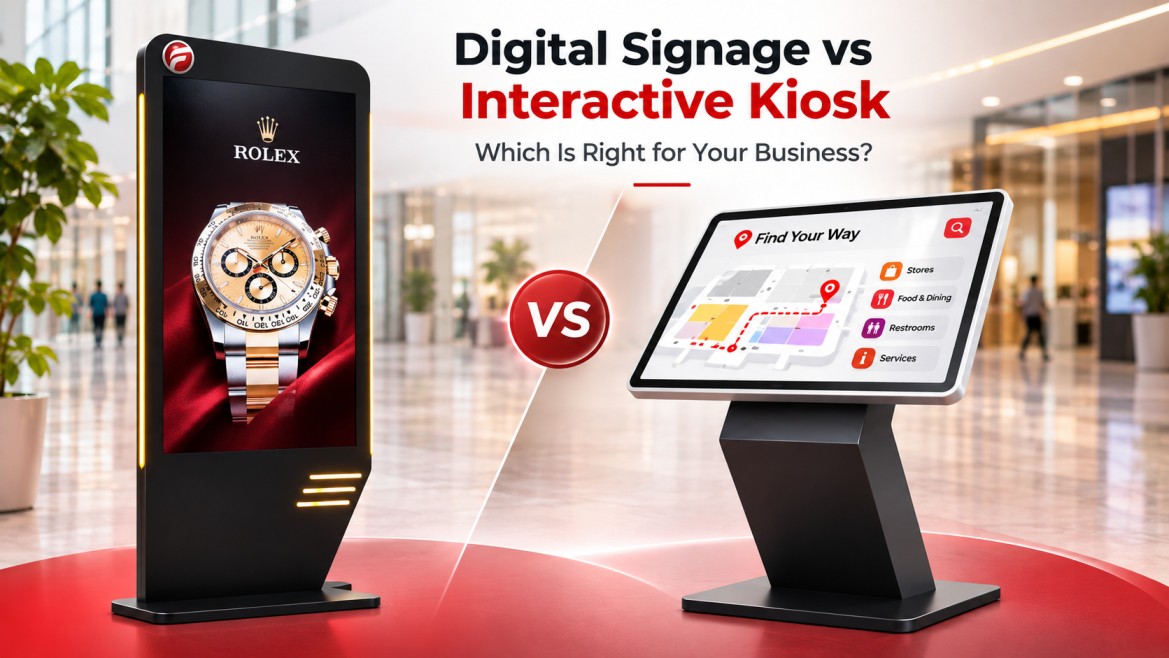
Imagine entering a hospital where a digital screen displays department timings, health announcements and visitor instructions. Nearby, another screen lets you search for a doctor, locate a department or begin a check-in process.
Both use digital displays, but they serve different purposes.
Digital signage vs interactive kiosk comes down to one key difference: digital signage communicates information, while an interactive kiosk helps people take action. For Indian businesses and institutions, choosing the right solution depends on visitor needs, the operating environment and the experience you want to deliver.
Malls, hospitals, airports, educational campuses, corporate offices and government facilities can all benefit from digital display technology. The challenge is understanding which solution fits the job—and when combining both makes sense.
Digital signage uses electronic displays to communicate information, announcements, promotions, schedules, menus and directions. Content can be updated remotely when the solution includes suitable content management software and network connectivity.
An interactive kiosk is a digital terminal designed to let users perform specific tasks. Depending on its hardware and software, it may support directory searches, wayfinding, appointment check-in, ticketing, information retrieval or visitor registration.
The main distinction is functionality, not simply whether a screen has a touchscreen.
A touchscreen displaying advertisements is not necessarily a complete self-service kiosk. Similarly, a kiosk may display announcements or promotional content alongside its interactive features.
The simple rule: If people primarily need to view information, consider digital signage. If they need to search, select, enter information or complete a task, consider an interactive kiosk.
Both technologies can improve how organisations communicate with visitors, but their intended uses differ.
| Feature | Digital signage | Interactive kiosk |
|---|---|---|
| Primary purpose | Display information and messages | Enable user interaction and tasks |
| Typical experience | View content | Touch, search, select or enter information |
| Common applications | Announcements, menus, promotions, schedules | Wayfinding, directories, check-in and self-service |
| User input | Usually not required | Usually required |
| Content or workflow management | Focuses on displaying and scheduling content | Focuses on interactive journeys and task completion |
| Key performance indicators | Screen uptime, content accuracy and campaign engagement | Task completion, successful searches, abandonment and uptime |
| Important operational needs | Content updates, connectivity and display maintenance | Software reliability, security, workflow testing and device support |
These categories are not mutually exclusive. A deployment can combine digital signage and interactive kiosk functions when the hardware, software and user interface support the intended experience.
For example, a hospital may display general announcements on digital signage while using an interactive kiosk to help visitors locate departments. Each screen has a distinct role within the same visitor journey.
The best choice depends on what visitors need to know or do at a particular location.

Digital signage can display promotions, seasonal campaigns, store announcements and event information. Interactive kiosks can help shoppers find stores, locate facilities or navigate a large shopping centre.
For malls with frequent campaigns and complex layouts, a combination may help communicate promotions while making navigation easier.
Hospitals need to communicate information clearly, particularly where visitors may be unfamiliar with the building.
Digital signage can display visiting hours, general instructions, health announcements and other public information. An appropriately configured interactive kiosk may help visitors search for doctors, locate departments or begin supported registration workflows.
Any kiosk handling patient details must be designed with appropriate privacy, security and access controls.
Digital signage is useful for shared information, directions and announcements. Interactive kiosks may help travellers search for facilities or access specific information.
Where information affects passenger movement or safety, buyers should also assess update procedures, system reliability and fallback arrangements.
Digital signage can communicate meeting schedules, campus announcements, event details and visitor instructions. Interactive kiosks can support building directories, visitor navigation and selected reception tasks.
Digital signage can explain procedures, display service announcements and communicate updates. Interactive kiosks may help people navigate service options or initiate supported transactions.
For public-facing deployments, consider regional-language requirements, accessibility, readable text and alternatives for visitors who need assistance.
There is no single price that applies to every digital signage or kiosk deployment. Costs depend on the project scope, hardware, software, installation requirements and ongoing support.
A single indoor display is a different investment from a multi-location signage network or an interactive kiosk connected to an organisation’s existing systems.
Before comparing quotations, evaluate these cost drivers:
For projects in India, request an itemised quotation that clearly separates hardware, software, installation, recurring fees and applicable taxes. Confirm GST treatment, warranty terms, AMC coverage, service response times and the scope of local support in writing.
Rather than selecting the lowest initial price, assess the expected lifecycle cost and the solution’s ability to meet your operational requirements.
Before contacting a supplier, define the problem you want to solve. A clear brief makes it easier to compare solutions on a like-for-like basis.
1. Identify the visitor’s primary need. Do people need to see information, find a location, register, search a directory or complete another task? Start with the outcome rather than the hardware.
2. Assess the installation environment. Record whether the screen will be indoors or outdoors. Consider lighting, heat, dust, humidity, power supply, network availability and physical access.
3. Define content and language requirements. Identify who will manage updates, how frequently content changes and whether English, Hindi or other regional languages are required.
4. Confirm software and integration needs. List any required connections to existing business systems. Ask the supplier to confirm compatibility, responsibilities and additional costs before procurement.
5. Review security and accessibility. Establish requirements for access control, software updates, data retention and session handling if personal information is processed. Consider readable text, intuitive navigation and assistance for users who need it.
6. Establish success measures. For digital signage, monitor content accuracy and uptime. For interactive kiosks, consider successful task completion, search success, abandonment and the number of users who still need staff assistance.
7. Verify support arrangements. Confirm installation responsibilities, warranty, AMC options, escalation procedures, spare-parts availability and software maintenance.
These checks help prevent a common procurement mistake: choosing hardware before understanding the visitor experience it must deliver.
No. Digital signage primarily displays information or promotional content. An interactive kiosk allows users to search, select options, enter information or complete supported tasks. Some solutions combine both functions.
Potentially, yes. The hardware, software and user interface must support both the display and interactive requirements. Confirm the capabilities of the proposed solution before purchasing.
It depends on the intended task. Digital signage is suitable for general announcements and instructions, while an appropriately configured interactive kiosk may support wayfinding, information searches or selected check-in workflows.
They can be, provided the equipment is specifically designed for the installation environment. Ask for documented operating-temperature limits, ingress protection, screen visibility, enclosure suitability and maintenance requirements. Do not assume that an indoor kiosk is suitable for outdoor conditions.
Ask about hardware specifications, software scope, integrations, security, accessibility, installation, warranty, AMC, service coverage, recurring charges and total lifecycle cost. Request written confirmation of all critical requirements.
Start with your most important visitor need. If people primarily need to see announcements or information, digital signage may be the right starting point. If they need to search, navigate or complete tasks independently, evaluate an interactive kiosk. A combined or phased deployment may suit more complex environments.
Digital signage and interactive kiosks can both improve visitor communication, but the right choice depends on the problem your organisation needs to solve.
Digital signage helps deliver information to an audience. Interactive kiosks give visitors a way to find information and take action independently. In larger facilities, combining the two may create a more connected visitor experience.
For Indian businesses and institutions planning a new deployment, begin by defining the site, audience, required functions, integration needs and support expectations. These details provide a stronger foundation for evaluating suppliers and comparing proposals.
Planning a digital signage or interactive kiosk project? Contact Firstouch to discuss your requirements and identify the next steps for your deployment.
BACK TO BLOG
we are always happy to help in ways that we can.


